redis 部分功能

慢查询

  1. 发送命令
  2. 排队
  3. 执行命令
  4. 返回结果

慢查询 是指 在 执行命令阶段

客户端超时不一定是慢查询,但慢查询可能会导致客户端超时

1
2
3
4
5
6
7
8
9
10
11
12
13
14
15
127.0.0.1:6379> config set slowlog-log-slower-than 1000  -- 设置时间 1000微秒
OK
127.0.0.1:6379> config get slowlog-log-slower-than
1) "slowlog-log-slower-than"
2) "1000"
127.0.0.1:6379> config set slowlog-max-len 1000 -- 设置慢查询队列 为 100
OK

127.0.0.1:6379> SLOWLOG get 100 # 获取慢查询队列 100条
(empty list or set)
127.0.0.1:6379> SLOWLOG len # 获取慢查询队列长度
(integer) 0

127.0.0.1:6379> SLOWLOG reset # 重置慢查询队列
OK

pipeline

redis 一条命令的时间往往是 微秒级别的

一次 pipeline 时间 = 1 次网络时间 + n 次命令时间

注意点

  1. 每个 pipeline 携带的数据量
  2. pipeline 每次只作用在 一个 redis 节点上

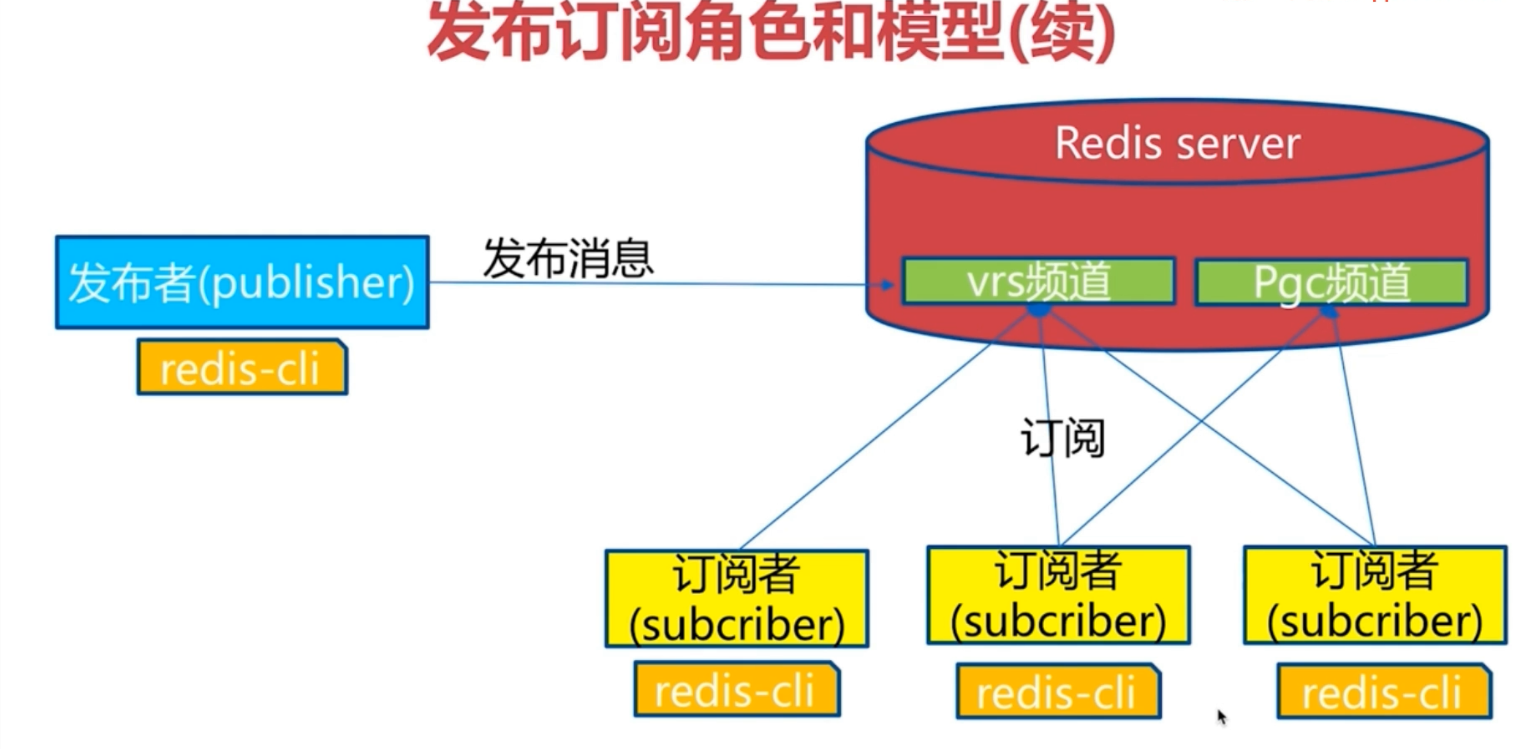
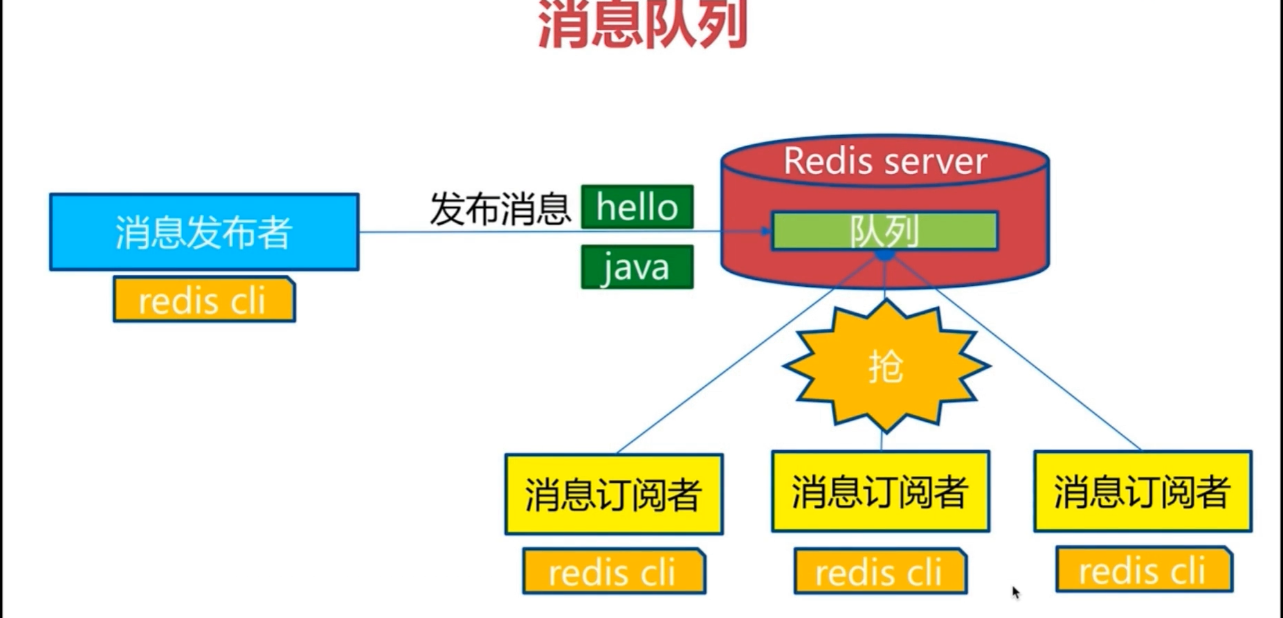
发布订阅,消息队列

订阅者无法获取 频道 订阅前的消息

  1. publish 发布
  2. subscribe 订阅
  3. unsubscribe 取消订阅

发布订阅
消息队列

1
2
3
4
5
6
7
127.0.0.1:6379> publish sohu:tv "hello world"  # 此时无人订阅
(integer) 0
127.0.0.1:6379> SUBSCRIBE sohu:tv # 新家一个订阅,未收到消息
Reading messages... (press Ctrl-C to quit)
1) "subscribe"
2) "sohu:tv"
3) (integer) 1

新开一个 redis-cli

1
2
127.0.0.1:6379> publish sohu:tv "hello world"
(integer) 1

前一个窗口

1
2
3
4
5
6
7
8
127.0.0.1:6379> SUBSCRIBE sohu:tv
Reading messages... (press Ctrl-C to quit)
1) "subscribe"
2) "sohu:tv"
3) (integer) 1
1) "message" # 新增了以下3行
2) "sohu:tv"
3) "hello world"

bitmap

hyperloglog

geo

地理信息定位,存储经纬度,主要用来计算两地距离,范围计算等

1
2
3
4
5
6
7
8
9
10
11
12
13
14
15
16
17
18
19
20
21
22
23
24
25
26
27
28
127.0.0.1:6379> geoadd cities:locations 116.28 39.55 beijing  -- 添加
(integer) 1
127.0.0.1:6379> geoadd cities:locations 116.28 39.55 beijing
(integer) 0
127.0.0.1:6379> geoadd cities:locations 118.01 39.38 tangshan
(integer) 1
127.0.0.1:6379> geoadd cities:locations 117.12 39.08 tianjing 114.29 38.02 shijiazhuang
(integer) 2

127.0.0.1:6379> type cities:locations -- 实际是 zset 实现
zset

127.0.0.1:6379> geopos cities:locations beijing -- 查询
1) 1) "116.28000229597091675"
2) "39.5500007245470826"
127.0.0.1:6379> geopos cities:locations tianjing
1) 1) "117.12000042200088501"
2) "39.0800000535766543"
127.0.0.1:6379> geodist cities:locations tianjing beijing km -- 计算两点距离 单位 km
"89.2061"

127.0.0.1:6379> georadiusbymember cities:locations beijing 100 km -- 查询距离 beijing 100km
1) "beijing"
2) "tianjing"
127.0.0.1:6379> georadiusbymember cities:locations beijing 200 km
1) "beijing"
2) "tianjing"
3) "tangshan"